Is Munki Still Relevant in 2026? Yes, But Not as Your MDM
Munki is alive in 2026: version 7 is a full Swift rewrite for macOS 26, but it was never an MDM. Where Munki still wins, and where Jamf and Intune take over.

Stabilise
Every year someone asks whether Munki is dead. And every year the answer is the same, except in 2026 it comes with a twist: while people were busy writing the obituary, the maintainers rewrote the entire thing in Swift.
Munki 7 dropped the old Python dependency completely. Every component is native Swift now. The current build, 7.1.1, was compiled on macOS 26.3 and supports everything from macOS 10.15 up to macOS 26. The 7.1 release even teaches Managed Software Center to hand off to System Settings when the only pending update is one of Apple's new Background Security Improvements. That is not a project on life support. That is a project keeping pace with Apple release for release.
So yes, Munki is relevant in 2026. But the more useful question is what it's relevant for, because that has changed.
What Munki is
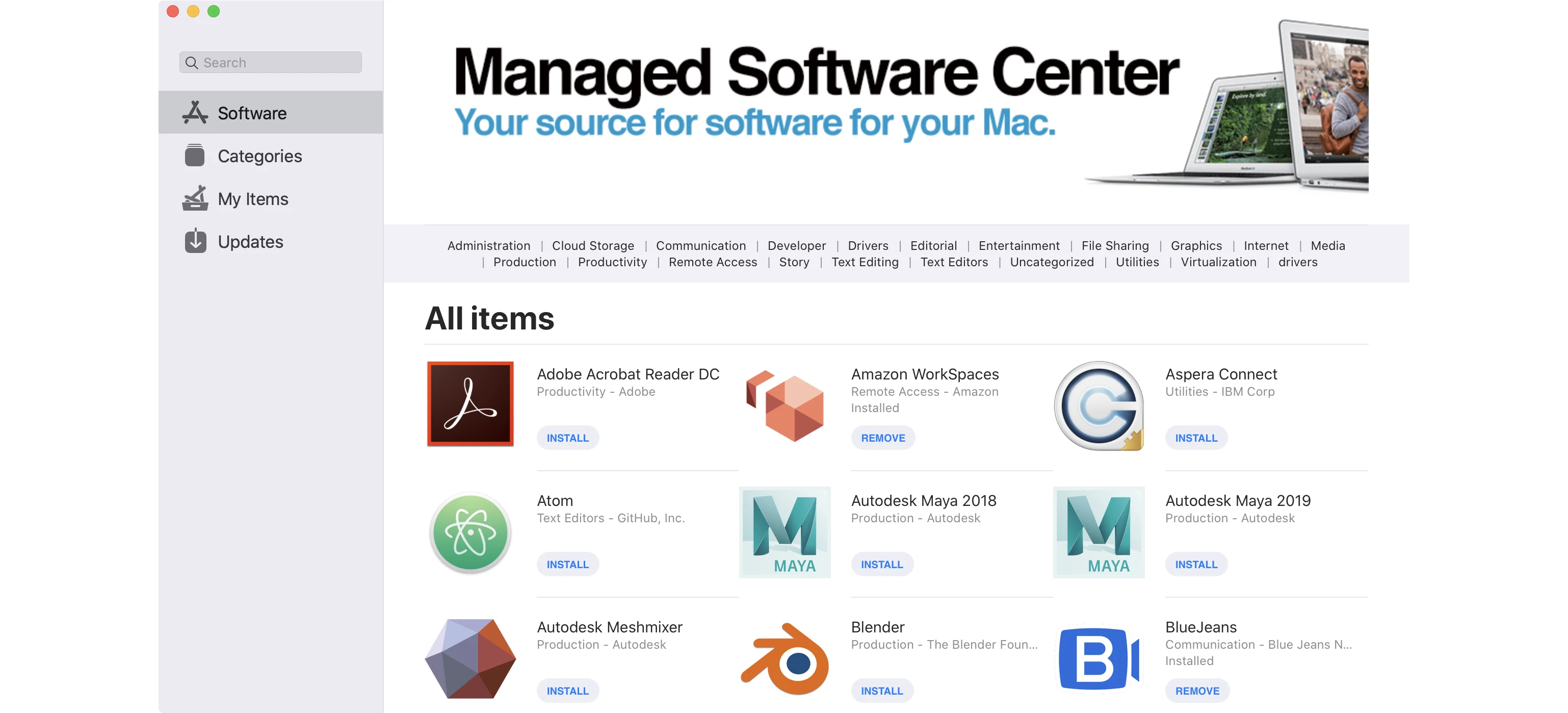
Munki is an open-source macOS software management system, originally built by Walt Disney Animation Studios. You point it at a repository of packages, define what should go on which machines, and it installs, updates and removes software accordingly. Users get a self-service app called Managed Software Center where they can install approved software themselves.
That is the whole job. Software. It is very good at it, and it has been for over a decade.
The trap people fall into is treating that history as if Munki were a Jamf competitor that lost. It isn't, because it was never trying to be an MDM in the first place.
Munki is not an MDM, and that's the point
This is the distinction the whole question hinges on. An MDM like Jamf, Mosyle, Intune, Apple Business or Iru handles the device: enrolment, configuration profiles, FileVault key escrow, passcode and encryption policy, remote lock and wipe, compliance reporting, identity. Munki handles none of that. It cannot enrol a Mac, cannot push a profile, cannot tell your auditor the fleet is compliant.
What Munki does that MDMs still do less elegantly is the mechanics of getting software onto a machine reliably:
- It installs using native macOS installer mechanisms, no repackaging into a vendor's proprietary format.
- Installs and updates are deterministic and repeatable. The same machine in the same state gets the same result every time.
- Dependencies, blocking applications and install order are first-class concepts, not afterthoughts.
- It targets Intel versus Apple silicon builds explicitly, and picks the right installer per device automatically. That still matters for any app not shipped as a universal binary.
- Self-service through Managed Software Center is mature and genuinely good.
If you have ever fought an MDM to make a complex app deploy in the right order without stepping on a running process, you understand why people keep Munki around.
The 2026 pattern: MDM plus Munki
Here's the setup that's getting the most attention this year, and it's the right mental model: Munki sits underneath your MDM, not next to it.
The pairing in the spotlight is Microsoft Intune plus Munki. Intune is the authoritative MDM, owning enrolment, profiles and compliance. Munki is the dedicated software-deployment layer doing all the third-party app work. A January 2026 write-up (opens in a new tab) makes the case that this combination can cover most of what teams used Jamf for, with cleaner separation between the management policy and the application logic.
That separation is the interesting bit. It mirrors how Jamf is built internally, MDM commands on one side and a software-delivery engine on the other, but with the two parts decoupled so each does its job without the other getting in the way. For a Windows-heavy organisation already paying for Intune, bolting Munki on is a way to get serious Mac app delivery without buying a second full platform.
You'll also still see Munki paired with Jamf in larger shops, usually where the team built deep Munki workflows years ago and sees no reason to throw away packaging logic that works.
Does declarative device management kill it?
This is the real 2026 question, and it deserves an honest answer rather than a reassuring one.
Apple's declarative device management expanded through 2026. The whole direction of Apple's platform is devices that apply policy autonomously, report status asynchronously, and keep working offline, with the OS and security update orchestration increasingly driven declaratively rather than by a server pushing commands. Munki 7.1 stepping aside for Background Security Improvements is a small sign of exactly this: Apple is taking over the update lane.
So the part of Munki's old remit that touched OS and security updates is genuinely being absorbed by the platform. If updates were your only reason for running Munki, that reason is shrinking.
But DDM does not package your line-of-business apps. It does not handle dependencies, blocking-app logic, or pick the right binary for Intel versus Apple silicon. Third-party software lifecycle, the messy real-world work of getting a hundred different installers to behave, is still not something declarative management solves. That is where Munki lives, and that lane is narrow and deep rather than disappearing.
The honest read: Munki's territory is getting more specialised, not wider. It is becoming a software-deployment specialist, full stop, as Apple reclaims everything adjacent.
For the record, we don't run Munki
We deploy whichever MDM fits the client, mostly Jamf and Mosyle, and we're well versed in Iru and the rest when a client standardises on something else. For app deployment we reach for Installomator (opens in a new tab) rather than a Munki repo. It's worth explaining why, because it shows there's more than one good answer to the same problem.
Installomator is a single zsh script with labels for over 1,500 apps. Instead of you packaging and hosting versioned installers, it downloads the current build straight from the vendor and installs it on the spot. We trigger it from the MDM's policies and Self Service, so a Mac pulls the latest Chrome, Slack, Figma or Office direct from source, with nothing for us to repackage and no repo to keep patched. For a managed fleet where the goal is "always on the latest vendor release," that model is hard to beat.
That's the real distinction. Munki is built around a curated, versioned repository you control, which is exactly what you want when you need to pin specific versions, stage rollouts, and offer a self-service catalogue with a proper GUI. Installomator is built around always-latest, low-maintenance delivery. Neither is wrong. They're different answers to "how does software get onto the Mac," and the right one depends on how much version control you need.
So when we say Munki isn't our default, that isn't a knock on it. It's that our MDM plus Installomator already covers the app layer for the fleets we run, with less to host and maintain.
So should you use it?
Here's where we land, and it depends entirely on your fleet. We specialise in Apple, and we don't reach for Munki by default.
For most UK SMEs, probably not on its own. If you've got fewer than roughly 50 Macs, the built-in app deployment in a modern MDM is now good enough. The free MDM inside Apple Business, or a platform like Mosyle or Jamf, will distribute your apps perfectly well. Standing up and self-hosting a Munki repository on top of that is real overhead, a server to maintain, packages to build, a workflow to learn, for a problem your MDM already mostly solves. Don't add moving parts you don't need.
Munki earns its keep when:
- You run a larger or more complex fleet where app deployment is genuinely hard, with real dependency chains and install-order requirements.
- You want self-hosted, transparent, scriptable control and you have the admin skill to run it.
- You're an Intune shop and Intune's native Mac app delivery isn't cutting it, but you don't want to pay for Jamf.
- You have heavy custom packaging needs, internal apps, niche installers, per-architecture builds, that an MDM handles clumsily.
It's the wrong tool if you want a single pane of glass, zero-touch onboarding with compliance reporting baked in, security automation and identity integration, or a vendor you can phone when it breaks. That's an MDM's job, and for a zero-touch deployment you're going to need one regardless.
Where everything sits in 2026
| The job | Who owns it |
|---|---|
| Device enrolment, zero-touch onboarding | MDM (Jamf, Mosyle, Intune, Apple Business, Iru) |
| Config profiles, FileVault, passcode policy | MDM |
| Compliance reporting, remote lock and wipe | MDM |
| OS and security update orchestration | Increasingly Apple's DDM, via your MDM |
| Third-party app packaging and deployment | Munki, Installomator, or your MDM if its app delivery is good enough |
| Self-service software for users | Munki's Managed Software Center, or MDM equivalent |
| Dependencies, install order, Intel vs Apple silicon | Munki's strongest territory |
The bottom line
Munki in 2026 is not dead, not abandoned, and not obsolete. The Swift rewrite proves it's being looked after properly. What it isn't, and never was, is the centre of a modern Apple management stack. That centre is your MDM.
Think of Munki as the specialist software-deployment engine you bolt under an MDM when app delivery is the hard part of your estate. For a lot of teams it's still the best tool in existence for that one job. For a lot of other teams, a good MDM has quietly made it unnecessary. Knowing which camp you're in is the real decision.
If you're not sure whether your Mac fleet needs Munki, a better MDM, or both, talk to us. We'll tell you straight, including when the answer is "you don't need the extra moving part."
Frequently asked questions
- Is Munki still maintained in 2026?
- Yes, and not just maintained. Munki 7 was a full ground-up rewrite in Swift that dropped the old Python dependency entirely, and version 7.1.1 was built on macOS 26.3 with support all the way back to macOS 10.15. The 7.1 release even added handling for macOS 26's Background Security Improvements. For an open-source project from Walt Disney Animation Studios, that is an unusually healthy pace. Anyone telling you Munki is abandoned is working from old information.
- Can Munki replace Jamf or an MDM?
- No, and it was never meant to. Munki does software deployment: app installs, removals, updates, dependencies, and self-service through Managed Software Center. It does not do device enrolment, configuration profiles, FileVault key escrow, remote lock or wipe, compliance reporting, or identity. Those are MDM jobs. You still need an MDM (Jamf, Mosyle, Intune, Apple Business, Iru) for the management layer. Munki sits underneath it as the app-delivery engine.
- What is the most common way to use Munki in 2026?
- Alongside an MDM, not instead of one. The pattern getting the most attention right now is Microsoft Intune plus Munki: Intune is the authoritative MDM for enrolment, profiles and compliance, and Munki handles all third-party software deployment. It mirrors how Jamf is built internally but with cleaner separation, and it lets Windows-heavy shops on Intune avoid paying for a second full platform just to get decent Mac app delivery.
- Does Apple's declarative device management make Munki obsolete?
- Not yet, and not for the job Munki is best at. Apple's declarative device management (DDM), which expanded through 2026, is taking over OS and security update orchestration so devices apply policy autonomously even when offline. That overlaps with one slice of what Munki used to do around updates. But DDM does not solve third-party app packaging, dependency handling, blocking-app logic, or per-architecture Intel-versus-Apple-silicon targeting. That is still Munki's lane, and it is still narrow and deep rather than going away.
- Should a small UK business use Munki?
- Usually not on its own. For most SMEs under about 50 Macs, a modern MDM's built-in app deployment, including the free MDM in Apple Business or a platform like Mosyle or Jamf, is now good enough that adding and self-hosting a Munki repo is overhead you do not need. Munki earns its place on larger or more complex fleets, where you want self-hosted control, heavy custom packaging, precise install ordering, or you are on Intune and want better Mac app delivery than Intune gives you alone.
- Munki or Installomator: which should I use with Jamf?
- It depends on whether you need version control. Munki is built around a curated, versioned repository you host and control, which suits pinning specific versions, staging rollouts, and offering a self-service catalogue with a full GUI. Installomator is a single zsh script with labels for over 1,500 apps that downloads the current build straight from the vendor and installs it, with nothing to repackage and no repo to maintain. For a fleet whose goal is keeping apps on the latest vendor release with minimal upkeep, Installomator is hard to beat, which is why we reach for it on our Jamf and Mosyle deployments. If you need to control exactly which version lands on each machine, Munki's model fits better. Plenty of shops run both.