98% of London's Creative Businesses Have Broken Email Security (And Don't Know It)
We audited 265 London creative businesses. 98% lack email encryption, 56% have no authentication, 41% no impersonation protection. Here's what SPF, DKIM, DMARC and MTA-STS do.

Stabilise
We recently scanned 265 creative businesses across London to check their email security. The results were genuinely alarming. Over 98% are leaving their domains wide open to impersonation attacks, phishing, and email fraud. And most don't even know it.
These aren't small startups. These are established agencies, production companies, and design studios. Businesses with clients, reputations, and revenue on the line. Yet their email security looks like it was set up in 2015 and never revisited.
Here's what we found, what it means for your business, and how to fix it.
The State of Email Security in London's Creative Sector
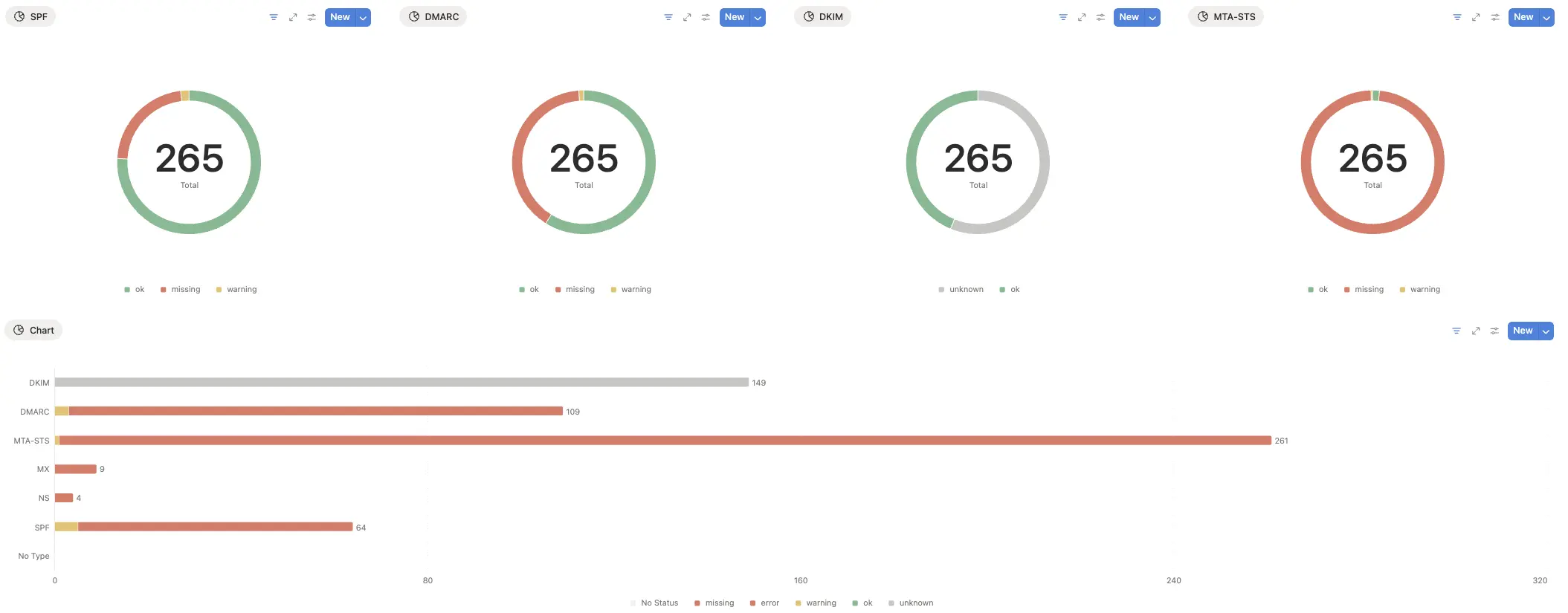
We audited DNS records for 265 domains across London's creative industries. The results paint a concerning picture:
MTA-STS (Email Encryption): 261 out of 265 missing (98.5%) Your emails travel across the internet unencrypted, vulnerable to interception.
DMARC (Email Authentication Policy): 109 out of 265 missing (41%) Anyone can impersonate your domain. No policy means no protection.
SPF (Sender Verification): 64 out of 265 missing or misconfigured (24%) Spammers can send emails that appear to come from your domain.
DKIM (Digital Signature): 149 out of 265 missing (56%) Your emails have no proof of authenticity. Recipients can't verify they're genuinely from you.
This isn't a minor oversight. This is fundamental security infrastructure that's simply absent.
Why This Matters to Your Business
Technical records might seem abstract, but the business consequences are real.
Client Trust Erodes Quietly When your invoices consistently land in spam folders, clients don't pay on time. When your proposals don't arrive, prospects assume you're disorganised. Email deliverability problems don't announce themselves with error messages. They just make you look unreliable.
Your Brand Becomes a Weapon Against You Without proper email authentication, scammers can send emails that appear to come from your domain. They can contact your clients requesting payment to fraudulent accounts. They can impersonate your directors in phishing attacks. And because there's no DMARC policy in place, these emails sail through to inboxes unchallenged.
Operational Friction Compounds Your business development team wonders why prospects aren't responding. Your project managers chase clients who claim they never received updates. Your finance team spends hours investigating why legitimate invoices are being flagged as suspicious. None of this gets attributed to email security because the problem is invisible.
Compliance Requirements Aren't Optional If you're pursuing Cyber Essentials certification or need to demonstrate GDPR compliance, email security controls are mandatory. You can't protect personal data in transit if your email infrastructure allows interception and impersonation.
What These Records Do
Let's demystify the four essential email security records.
SPF (Sender Policy Framework) SPF tells the world which mail servers are authorised to send email on behalf of your domain. It's a published list of approved senders. Without SPF, any mail server anywhere can claim to be sending from your domain. Think of it as a guest list at a venue. If someone's not on the list, they shouldn't be claiming they're with your party.
DKIM (DomainKeys Identified Mail) DKIM adds a digital signature to your outgoing emails. This signature proves two things: the email genuinely came from your domain, and it hasn't been tampered with during transit. It's like a wax seal on a letter. If the seal is intact, you know the letter is authentic and unaltered.
DMARC (Domain-based Message Authentication, Reporting and Conformance) DMARC is the enforcement layer that tells other email servers what to do when an email fails SPF or DKIM checks. Without DMARC, you're publishing security records but not setting policy. It's like installing a burglar alarm but never turning it on. DMARC activates your protection.
MTA-STS (Mail Transfer Agent Strict Transport Security) MTA-STS forces email servers to use encrypted connections when sending mail to your domain. It's HTTPS for email. Without MTA-STS, emails to your domain might travel unencrypted, even between modern mail servers that support encryption. Bad actors can intercept these messages, reading confidential client communications, project details, and financial information.
Check Your Email Security Right Now
Want to know if your domain is protected? We've built a free tool that checks all four records in seconds.
Here's how it works:
- Send an empty email to audit@trust.stabilise.io (opens in a new tab) from your business email address
- You'll receive a detailed security report within minutes
- The report shows exactly which records are missing or misconfigured
- You'll get specific recommendations for your email platform
Important: Your email address is used solely to generate your security report and is deleted immediately afterwards. We don't store your details, add you to mailing lists, or use your information for any other purpose. This is a genuinely free tool designed to help you understand your current security posture.
Why Your IT Provider Hasn't Fixed This
If your current IT provider or internal team hasn't mentioned these records, it's likely for one of two reasons.
First, they don't check DNS as part of their security baseline. Many IT companies focus exclusively on endpoint protection, firewalls, and user management. DNS security falls outside their standard audit checklist.
Second, they know about it but don't prioritise invisible fixes. Email authentication doesn't generate support tickets when it's missing. There's no alert, no error message, no obvious problem. It just quietly undermines your security and deliverability.
The uncomfortable truth: most IT companies focus on what's visible and billable. Firewalls get attention because businesses ask about them. Endpoint protection gets attention because it prevents obvious infections. DNS records? They're invisible until something goes wrong.
At Stabilise, we check the fundamentals first. Before we talk about advanced security solutions, we verify your email infrastructure is properly configured. It takes an hour to audit and a day to implement. There's no excuse for leaving it unaddressed.
How to Fix This Yourself
If you want to implement these records yourself, here's exactly how to do it for the two most common email platforms.
For Google Workspace
Setting up SPF
- Log into your DNS provider (Cloudflare, GoDaddy, 123-Reg, etc.)
- Navigate to DNS management for your domain
- Add a new TXT record:
- Name/Host: @
- Value:
v=spf1 include:_spf.google.com ~all - TTL: 3600
- Save and wait 10-15 minutes for propagation
Setting up DKIM
- Log into Google Workspace Admin console
- Navigate to Apps → Google Workspace → Gmail → Authenticate email
- Click "Generate new record"
- Copy the DKIM record details provided
- Go to your DNS provider and add the TXT record with the details Google provides
- Return to Google Admin and click "Start authentication"
Setting up DMARC
- Go to your DNS provider
- Add a new TXT record:
- Name/Host:
_dmarc - Value:
v=DMARC1; p=none; rua=mailto:dmarc@yourdomain.com - TTL: 3600
- Name/Host:
- Start with
p=noneto monitor only - After two weeks with no issues, update to
p=quarantine, then eventuallyp=reject
Setting up MTA-STS
- Create a text file named
mta-sts.txtwith this content:
version: STSv1 mode: enforce mx: aspmx.l.google.com mx: alt1.aspmx.l.google.com mx: alt2.aspmx.l.google.com mx: alt3.aspmx.l.google.com mx: alt4.aspmx.l.google.com max_age: 86400
- Host this file at:
https://mta-sts.yourdomain.com/.well-known/mta-sts.txt - Add a DNS TXT record:
- Name/Host:
_mta-sts - Value:
v=STSv1; id=20240101T000000 - TTL: 3600
- Name/Host:
For Microsoft 365
Setting up SPF
- Log into your DNS provider
- Add a new TXT record:
- Name/Host: @
- Value:
v=spf1 include:spf.protection.outlook.com ~all - TTL: 3600
Setting up DKIM
- Log into Microsoft 365 Admin Centre
- Navigate to Settings → Domains
- Select your domain and click "DNS Records"
- Look for DKIM records (Microsoft generates two CNAME records)
- Add both CNAME records to your DNS provider as specified
- Return to Microsoft 365 Admin Centre
- Navigate to Security → Email & Collaboration → Policies & Rules → Threat Policies → DKIM
- Enable DKIM signing for your domain
Setting up DMARC Follow the same process as Google Workspace. DMARC configuration is platform-independent.
Setting up MTA-STS
- Create a text file named
mta-sts.txtwith this content:
version: STSv1 mode: enforce mx: yourdomain-com.mail.protection.outlook.com max_age: 86400
- Check your actual MX records in DNS to get the correct Microsoft mail server hostname
- Host this file at:
https://mta-sts.yourdomain.com/.well-known/mta-sts.txt - Add a DNS TXT record:
- Name/Host:
_mta-sts - Value:
v=STSv1; id=20240101T000000 - TTL: 3600
- Name/Host:
What Happens Next
Once these records are properly configured, you'll notice several improvements:
- Better email deliverability: Your legitimate emails are less likely to be flagged as spam
- Protection from impersonation: Scammers attempting to forge emails from your domain will find their messages blocked
- Improved security posture: You've addressed fundamental infrastructure vulnerabilities that most businesses overlook
- Compliance readiness: You're meeting email security requirements for Cyber Essentials and GDPR
The implementation takes a few hours. The protection lasts indefinitely.
The Wider Question
If your current IT provider hasn't checked whether these fundamental security records are configured, what else might they be missing?
Email authentication isn't obscure. It's not cutting-edge. SPF has been around since 2006. DKIM since 2007. DMARC since 2012. These are established standards that every business email system should have configured correctly.
At Stabilise, we start with the fundamentals. Before we recommend advanced security solutions, we verify your infrastructure is solid. We check DNS records, audit email security, review your MDM configuration, and ensure compliance requirements are met. Not because these tasks generate support tickets, but because they're the foundation everything else relies on.
Your email security should be invisible because it's working, not because it's absent.
Ready to check your email security? Send an empty email to audit@trust.stabilise.io (opens in a new tab) and get your free security report in minutes. Your email address will be deleted immediately after generating your report.
Be sure to check your spam folder as long emails / reports with no prior conversation history can trigger this type of email to be marked as such.